What the spreadsheet looks like
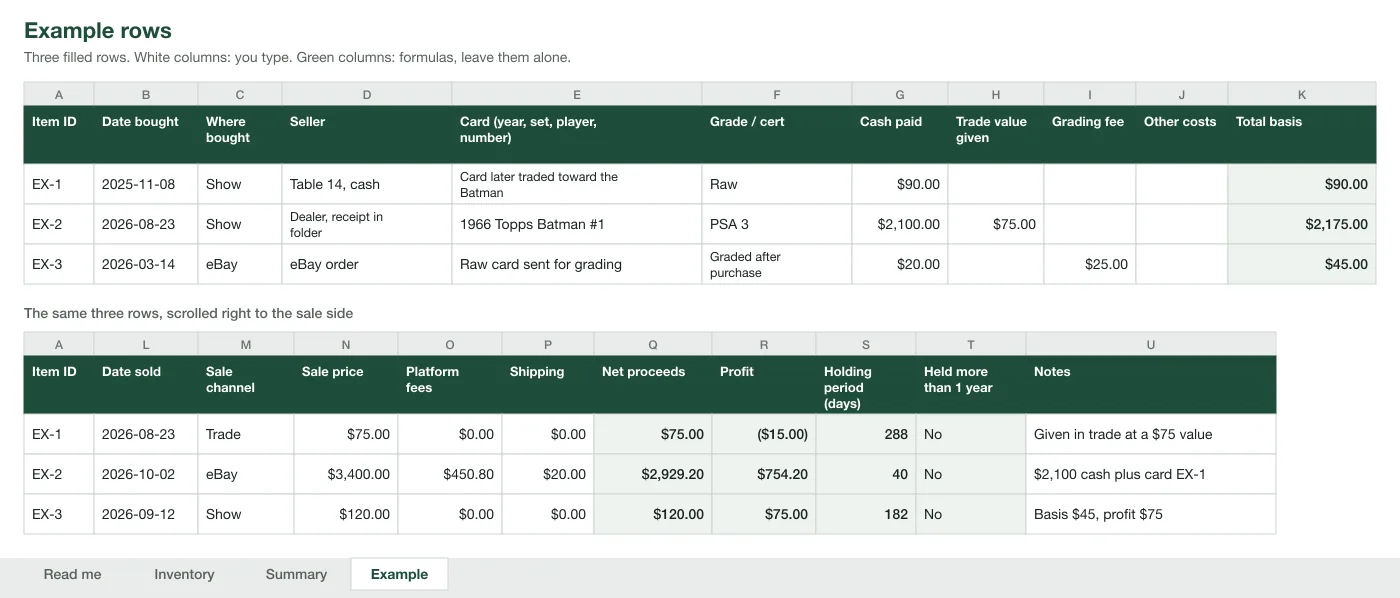
The file has four tabs: Read me, Inventory, Summary and Example. The picture below is a drawing of the Example tab with its three filled rows, split in two so it fits the page. The top band is the cost side of each card. The bottom band is the sale side of the same three cards.
- Read me: what each cost column holds and how to use the file.
- Inventory: 1,000 rows with the formulas already in them. This is the tab you work in.
- Summary: totals by channel and by month, and the Schedule C helper. Change the tax year in cell B2.
- Example: three filled rows to copy from. It does not feed the Summary.
It is built for a seller, not a set collector. There is no checklist of every card in a set and no automatic price lookup. Every column exists to answer one question: what did this card cost, and what did it make.
How to use it, step by step
Fill in the left half of a row when you buy a card and the right half when you sell it. The formulas do the rest.
- Download the Excel file and save a copy named for the year. Open it in Excel, or import it into Google Sheets.
- Go to the Inventory tab. For every card you own now, type an Item ID, the date bought, where you bought it, the seller, the card and its grade.
- Type what it cost: Cash paid, plus Trade value given, Grading fee and Other costs if they apply. Total basis fills itself.
- Write the Item ID on the sleeve, the slab sticker or the receipt, so the row can be matched to the card.
- When the card sells, type Date sold, pick the Sale channel, and enter Sale price, Platform fees and Shipping. Net proceeds, Profit and Holding period fill themselves.
- Once a month, open the Summary tab and compare each channel's total with the platform's own report.
- In January, check line 41 against a count of the cards you still hold, then give the Summary tab to your preparer.
Starting mid-year is fine. Enter the cards you hold today with their real purchase dates, then add this year's sold cards from your order history. Cards bought before January 1 and unsold on that date become line 35 by themselves.
The columns
The Inventory sheet has 21 columns, one row per card. White columns are typed by you. Green columns are formulas and fill themselves once the inputs are there.
| Column | What goes in it | Filled by | Why it is there |
|---|---|---|---|
| A. Item ID | Your own label, also written on the sleeve or receipt | You | Ties the row to the card and its paper |
| B. Date bought | The day you paid or traded for the card | You | Decides which tax year the purchase falls in |
| C. Where bought | Show, eBay, Whatnot, shop, trade, pack or box, collection buy, other | Drop-down list | Tells you where to find the receipt |
| D. Seller | Name, table number or order number | You | Part of the proof of a cash buy |
| E. Card | Year, set, player or character, card number | You | Identifies the item |
| F. Grade / cert | Grader, grade and cert number, or raw | You | A cert number identifies one exact slab |
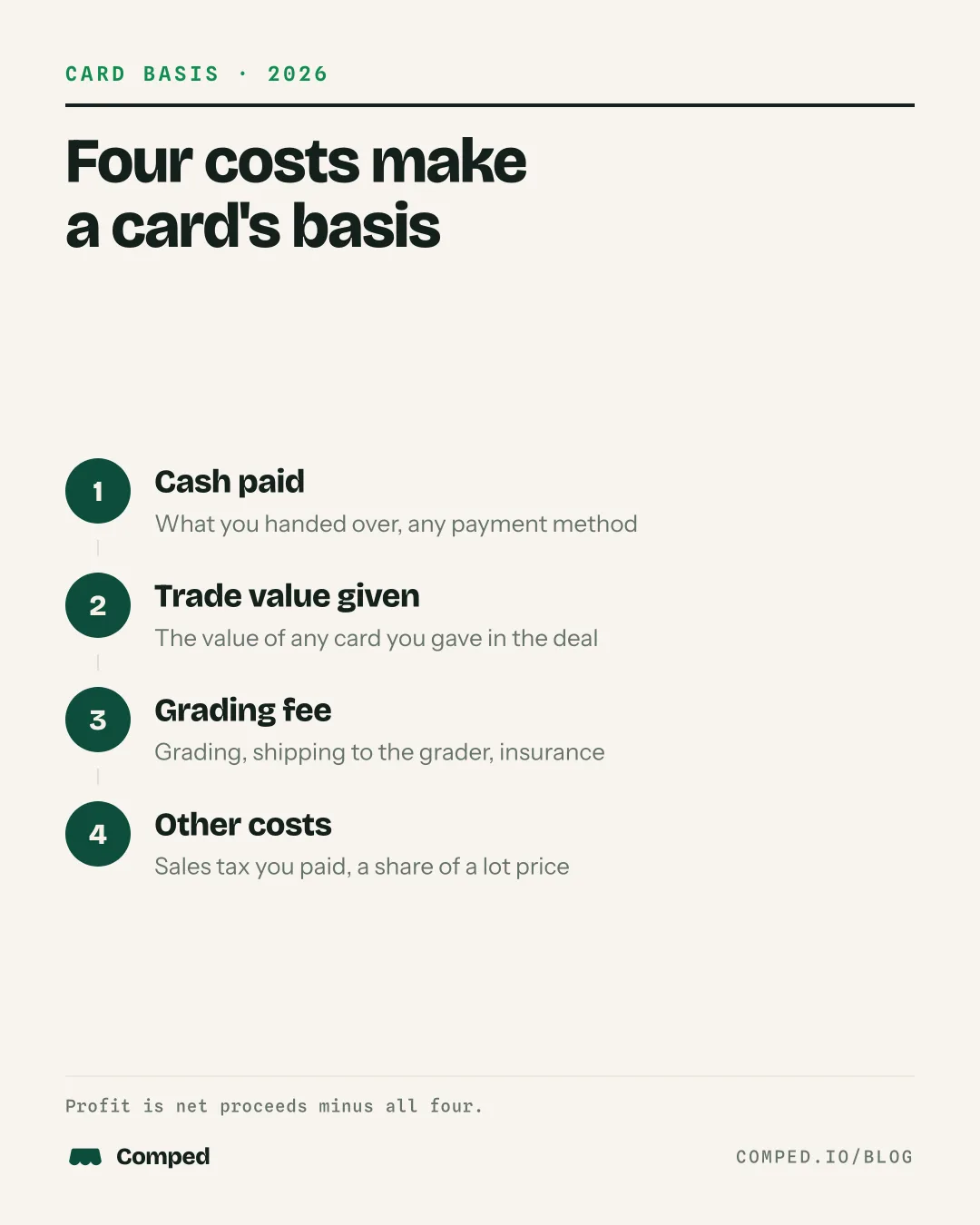
| G. Cash paid | What you handed over, by any payment method | You | Schedule C line 36, purchases |
| H. Trade value given | The value of any card you gave in the deal | You | Also line 36. A trade is a purchase paid in cards. |
| I. Grading fee | Grading, shipping to the grader and insurance for this card | You | Line 39, other costs |
| J. Other costs | Sales tax you paid on the purchase, a share of a lot price | You | Line 39, other costs |
| K. Total basis | Cash paid plus trade value plus grading fee plus other costs | Formula | The number subtracted from the sale |
| L. Date sold | The day the card left in a sale or a trade | You | Decides which tax year the sale falls in |
| M. Sale channel | Show, eBay, Whatnot, Fanatics Collect, TCGplayer, shop, trade, other | Drop-down list | Lets you check each platform's 1099-K |
| N. Sale price | What the buyer paid for the card, before fees and without sales tax | You | Gross receipts, Schedule C line 1 |
| O. Platform fees | Final value, processing and promoted listing fees for this sale | You | A selling expense |
| P. Shipping | Postage and supplies you paid to send it | You | A selling expense |
| Q. Net proceeds | Sale price minus platform fees minus shipping | Formula | What reached you |
| R. Profit | Net proceeds minus total basis | Formula | What the card made |
| S. Holding period | Days between purchase and sale | Formula | Also your days to sell |
| T. Held more than 1 year | Yes or No | Formula | Matters to an investor's capital gain |
| U. Notes | Anything a preparer would ask about | You | Where the receipt is, who the buyer was |
Sale price is gross on purpose. A Form 1099-K reports gross payments and does not subtract fees, refunds or shipping, so keeping the same gross figure lets you reconcile the form against your own rows. The 1099-K reconciliation calculator walks from Box 1a down to profit, and the master tax guide explains how profit, not the gross, is what gets taxed.
The holding period column matters most to collectors. An investor's gain on a card held more than one year is long term, and collectible gains can be taxed at up to 28%. A dealer's cards are inventory, so the gain is ordinary business income on Schedule C whatever the holding period.
For platform fees, copy the figure from the order page. To estimate before you list, the 2026 platform fee table has each marketplace's rates.
Opening it in Google Sheets
Download the Excel file, open Google Sheets, start a blank spreadsheet, then choose File, Import, Upload and pick the file. Select Replace spreadsheet. The formulas, the drop-down lists and all four tabs come across.
Excel opens the file directly. If you only want the columns, import the CSV instead; it has no formulas, so Total basis, Net proceeds and Profit will need to be typed or rebuilt.
A Google Sheets copy lives in your own Drive, so it works on a phone at a show through the Sheets app. Typing 21 columns on a phone is slow. It is quicker to write deals on paper at the table and type them in that night; the card show inventory sheet is made for that.
Recording a trade
A trade is two rows. The card you gave away is sold through the Trade channel at its trade value. The card you received is bought, with that same value in Trade value given and any cash in Cash paid.
That follows the IRS barter rule in Tax Topic 420: the fair market value of what you receive in an exchange is income, and in a business it goes on Schedule C. The cost basis guide for cash and trade buys walks through the same deal in more detail.
A REAL DEAL, WORKED
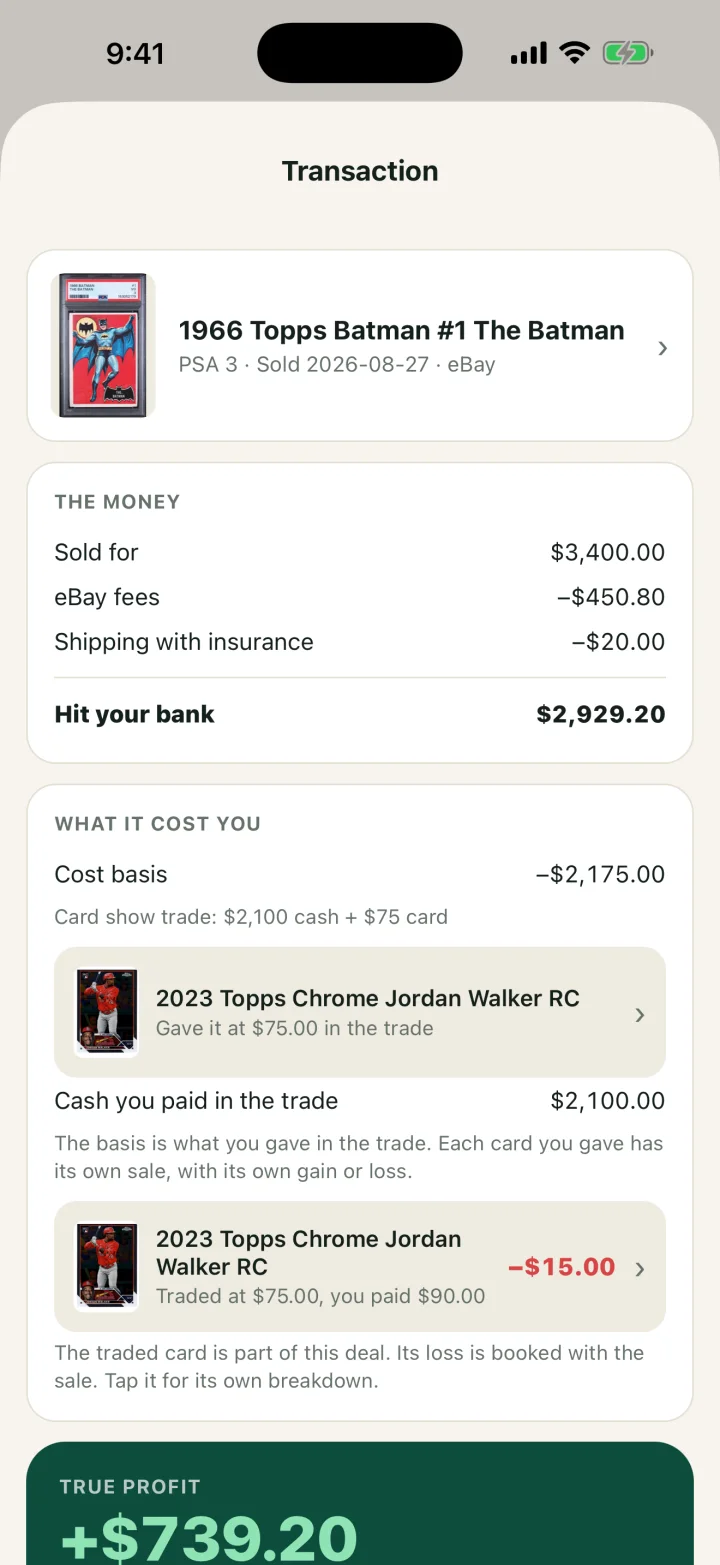
A 1966 Topps Batman #1 PSA 3 bought at a show for $2,100 cash plus a traded card valued at $75. The traded card had cost $90. The Batman later sold on eBay for $3,400.
Both rows are on the Example tab of the file, along with a graded card: a $20 raw card plus a $25 grading fee has a $45 basis, so a $120 sale is a $75 profit. The grading fee guide explains why the fee sits in the card's basis.
If you receive cash in a trade, the row for the card you gave still shows its full trade value as the sale price. The card you received gets a lower Trade value given: the value you gave minus the cash that came back.
Lots, boxes and breaks
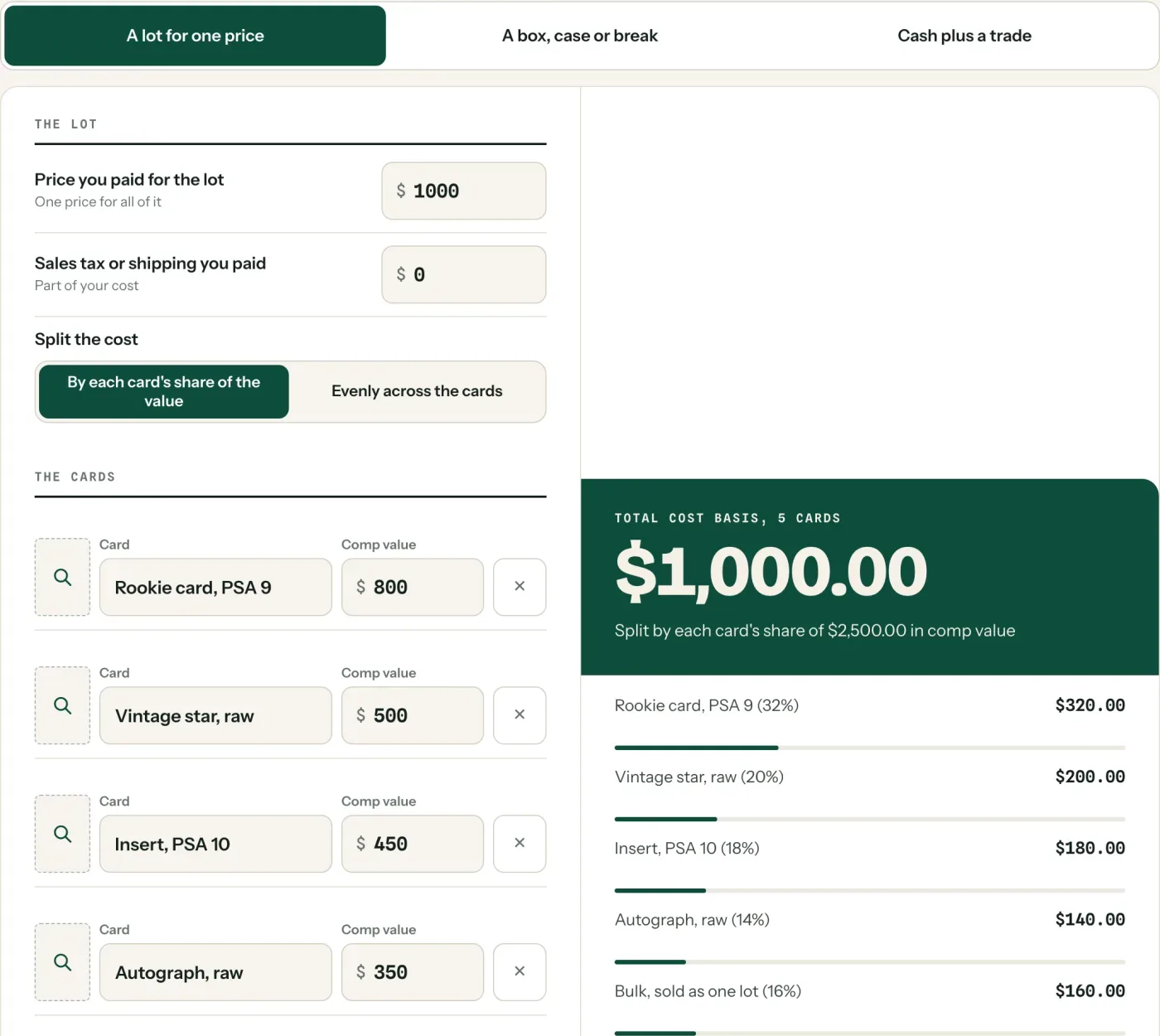
A lot bought for one price needs its cost split across the cards before the rows can be filled. There is no IRS ruling specific to cards. The reasonable method is to split the price by each card's share of the lot's value, or evenly when the cards are alike.
A $1,000 LOT, SPLIT BY VALUE (EXAMPLE)
Five items bought together for $1,000. Their comp values add up to $2,500, so each one carries 40 cents of cost per dollar of value.
Each line becomes one row, with its share in Cash paid and "lot of 5, split by value" in Notes. Bulk you will sell together can stay as one row. The free card cost basis calculator does this split for a lot, a box or a break, and for cash plus a trade.
Decide whether to grade before or after you make the row; it does not matter. Add the grading fee to the same row when you pay it, and update Grade / cert when the slab comes back.
The Summary sheet and Schedule C
The Summary sheet turns the rows into the totals a tax preparer asks for. Type the tax year in cell B2, and three blocks update from the Inventory tab.
Sales by channel counts the cards sold and totals sale price, fees and shipping, net proceeds and profit for each channel in the year. Use it to check each platform's 1099-K or annual report. By month shows cards bought, money spent on cards, cards sold, sales and profit for each month.
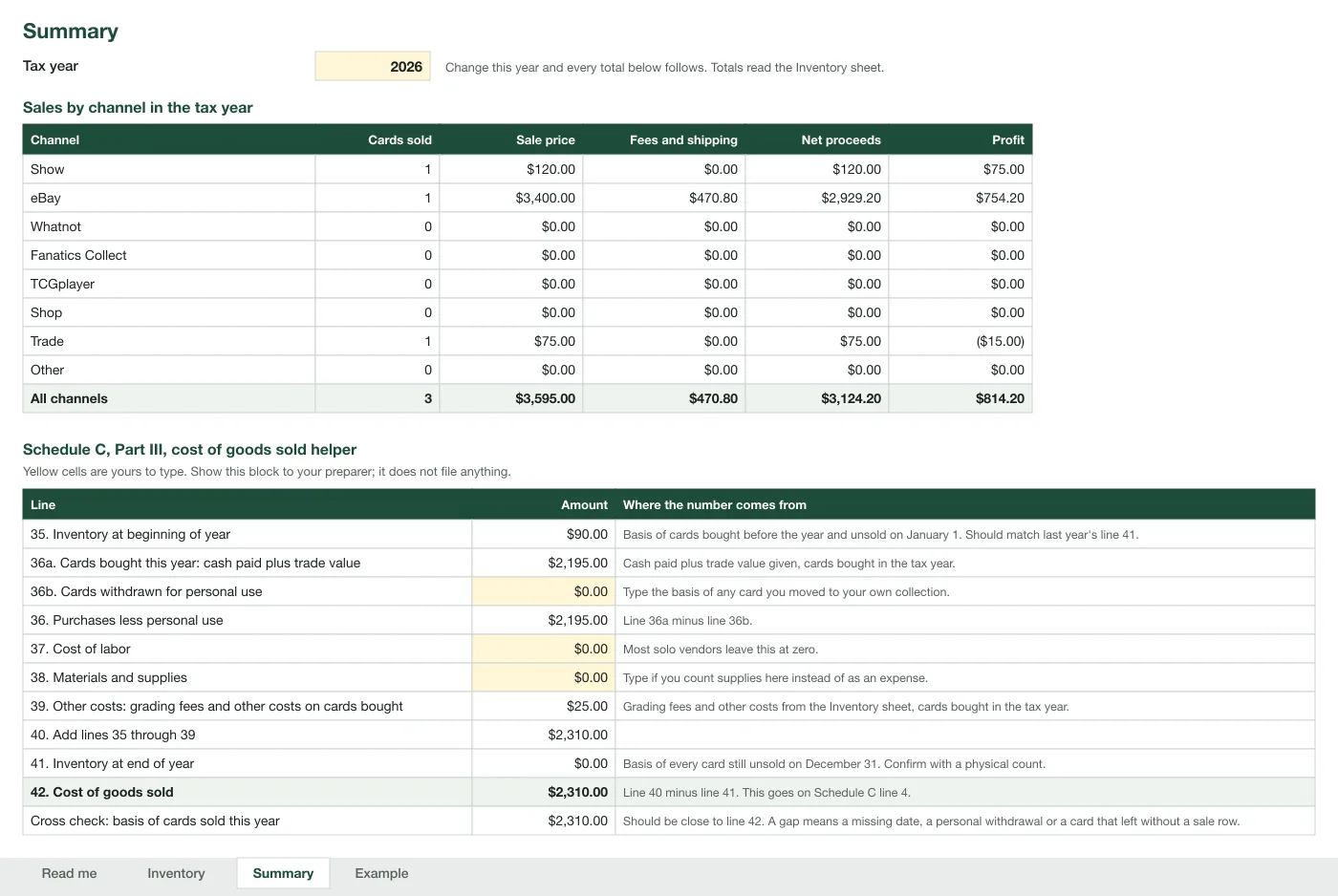
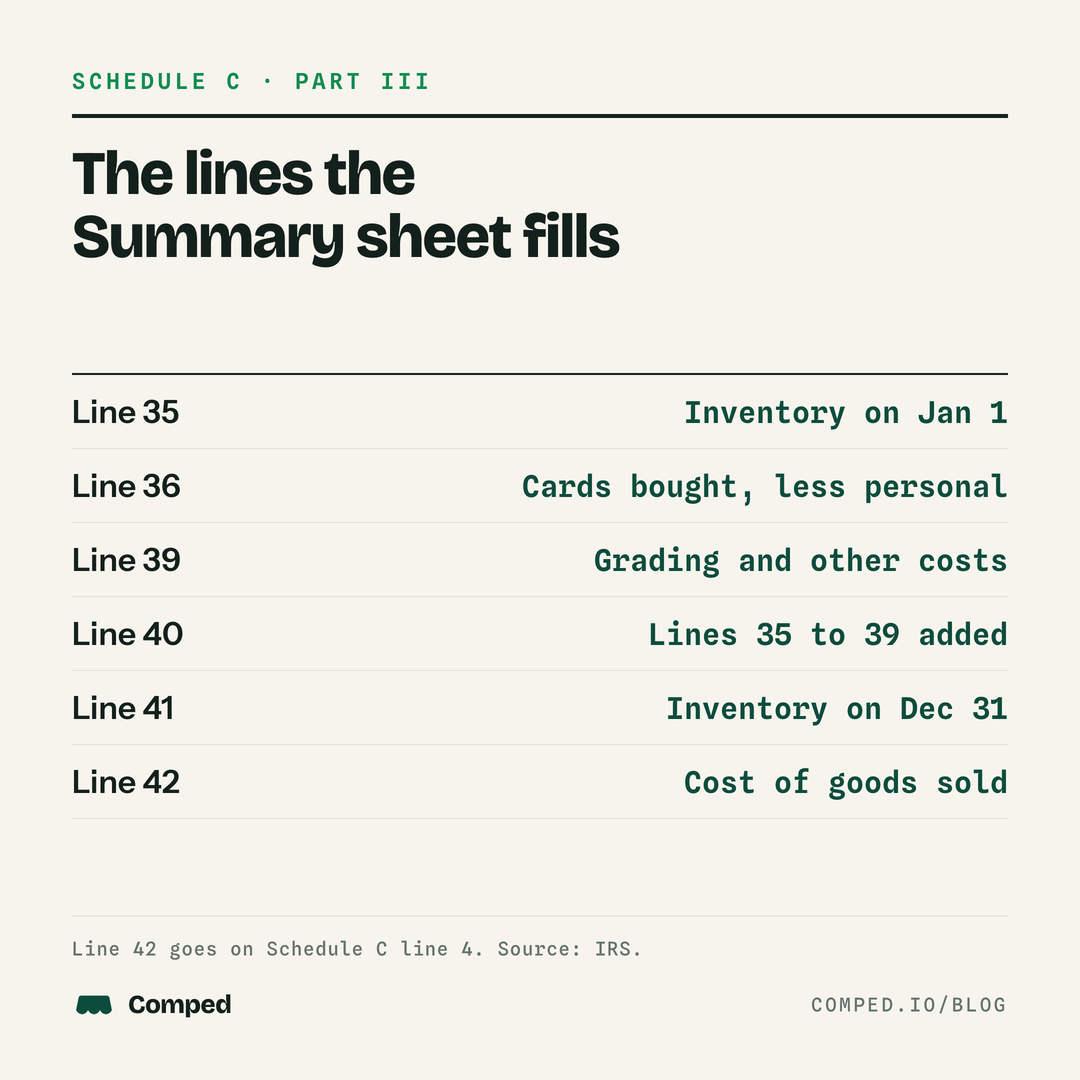
The cost of goods sold helper follows Schedule C Part III, lines 35 to 42. This is the part of the form it fills:
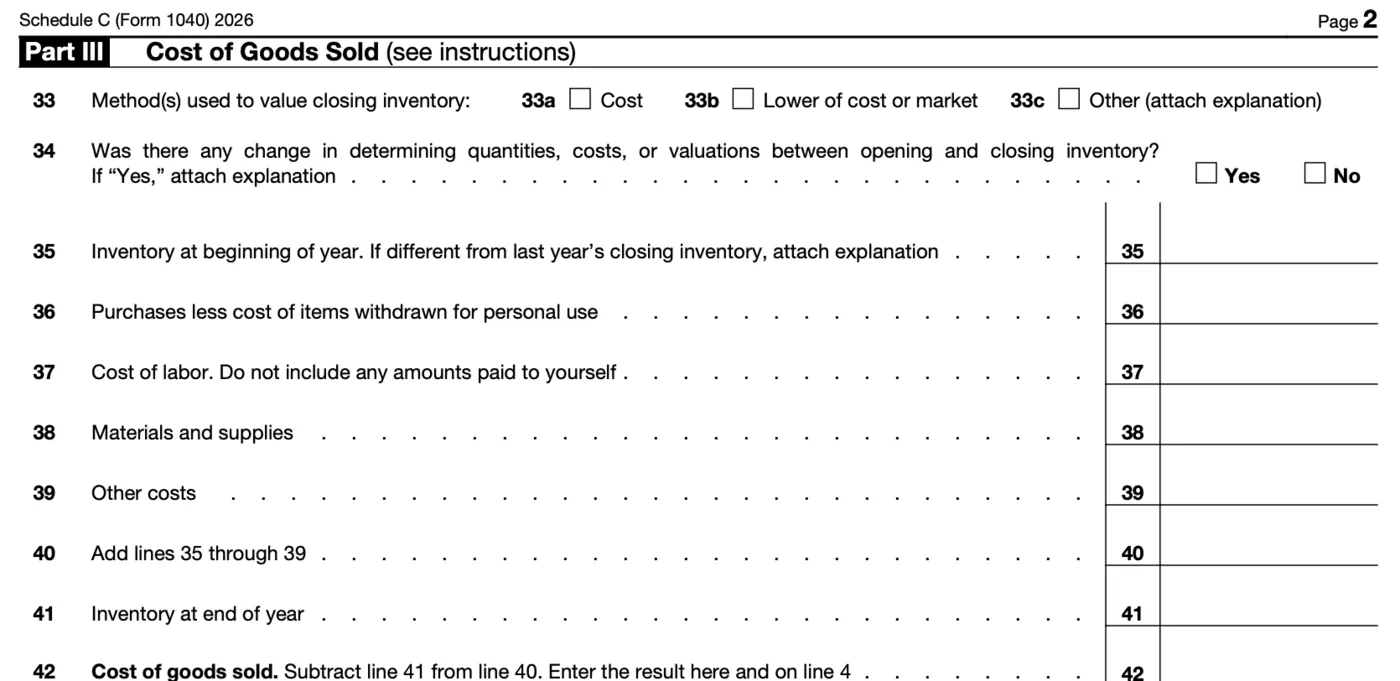
| Schedule C line | Where the spreadsheet gets it | With the 3 example cards |
|---|---|---|
| 35. Inventory at beginning of year | Total basis of cards bought before the year and unsold on January 1 | $90.00 |
| 36. Purchases less personal use | Cash paid plus Trade value given for cards bought in the year, minus any card you type in as moved to your own collection | $2,195.00 |
| 39. Other costs | Grading fee plus Other costs for cards bought in the year | $25.00 |
| 40. Add lines 35 through 39 | A sum | $2,310.00 |
| 41. Inventory at end of year | Total basis of every card still unsold on December 31 | $0.00 |
| 42. Cost of goods sold | Line 40 minus line 41. It also goes on line 4. | $2,310.00 |
| 1. Gross receipts or sales | Sale price, All channels row | $3,595.00 |
The example checks out by hand. Sales of $3,595.00, minus cost of goods sold of $2,310.00, minus fees and shipping of $470.80, is $814.20, the same as the Profit total. Fees and shipping are business expenses that go in Part II of Schedule C. Which line they sit on is a choice for you and your preparer; our reading is that marketplace fees fit line 10, commissions and fees.
Lines 33 and 34 are not in the file. They ask how you value inventory and whether the method changed. This spreadsheet tracks cost. Lines 37 and 38 are yellow cells you can type in; most solo sellers leave them at zero.
THE SMALL RESELLER METHOD
Resellers with average gross receipts of $32 million or less for 2026 may skip formal inventories, under IRS Publication 334. A card's cost is then deducted in the year the card sells. The Summary's cross check line, the basis of cards sold this year, is that number. Ask your preparer which method your return uses.
Line 41 is only as good as your rows. Count the boxes before December 31 and compare; the year-end card inventory count explains how. The card sale tax calculator then estimates the federal tax on any single row.
Table fees, mileage and supplies are not in this file, because they belong to the business and not to one card. Keep them in a separate list; the write-off guide has the categories.
Adding your own columns
Add your own columns to the right of Notes, from column V on, so the formulas and the Summary keep pointing at the right cells. These are columns other card spreadsheets include, with the formula for row 5 where one applies. Fill each one down the column.
| Column to add | What to type | Use |
|---|---|---|
| Location | A code such as B4 for box B, row 4 | Find the card when it sells |
| Current value | A recent sold price you looked up, and the date you checked | See what unsold stock is worth |
| Unrealized gain | The current value cell minus K5, for unsold cards | Paper gain. Not taxed until the card sells. |
| Return on cost | =IF(R5="","",R5/K5), formatted as a percent | Compare a $20 flip with a $2,000 one |
| Asking price | Your sticker or listing price | Know your room to negotiate |
| Days in stock | =IF(OR(B5="",L5<>""),"",TODAY()-B5) | Spot cards that have sat too long |
The file has no live price feed. Formulas that pull prices from websites break whenever the site changes, and a wrong price is worse than a dated one. Type the value and the date you checked it.
For a marketplace that is not in the Sale channel list, pick Other and name it in Notes. The Summary counts only the eight channels in the list, and a sale with no channel picked is counted in no row.
Pokemon cards and pack pulls
The same file works for Pokemon, One Piece and any other trading card. Put the set and card number in the Card column and the grader and cert in Grade / cert. The tax rules do not change by game.
Pack and box openings need one extra step. There is no IRS ruling specific to cards, but the reasonable method is to spread the box cost across the cards you keep and sell. Enter one row per card worth tracking with its share in Cash paid, and pick Pack or box in Where bought. The Pokemon selling guide covers pack pulls and childhood collections.
Sealed boxes you hold to resell can go in the same sheet, one row per box, with "sealed" in Grade / cert. Playsets and bulk can be one row per lot. Give a card its own row once it is worth pricing by itself.
Common mistakes
Most errors in a card spreadsheet come from six habits, and each one changes a number on the return.
| Mistake | What it does | Fix |
|---|---|---|
| Typing the payout as the Sale price | Sales come out lower than the platform's 1099-K, and fees get counted twice if you also enter them | Enter the gross price, then the fees |
| Including sales tax in the Sale price | Overstates income. Tax you collect at a show is owed to the state. | Keep it out of column N and note it apart |
| Entering a trade as one row | The card you gave never shows as sold, so it stays in line 41 forever | Two rows, as in the Example tab |
| Leaving Date sold or Sale channel blank | The sale is missing from the year or from every channel row | Fill both for every sale |
| Typing over a green column | The formula is gone for that row, and totals stop following your inputs | Copy the cell from the row above |
| Keeping a card for yourself and leaving its row | Its cost stays in purchases and inflates cost of goods sold | Type its basis in line 36b on the Summary |
If last year's file has these problems, fix the rows and tell your preparer what changed. The guide to card sales with no receipts covers rebuilding costs you never wrote down.
The records behind each row
A spreadsheet row is a summary, not proof. IRS Publication 583 lists what supports a purchase: invoices, account statements, card slips, canceled checks and petty cash slips. For a cash or trade buy at a show, that means a written receipt with the seller, date, item and price.
Write the Item ID on each receipt, sleeve or order page so a row can be traced to its paper. For cash at the table, the printable card show cash and trade log captures each deal as it happens, and its rows copy straight into this sheet.
Keep the file and the receipts for at least 3 years after you file. The IRS record period is 6 years if income was under-reported by more than 25%, and indefinitely if no return was filed.
How this looks in the Comped app
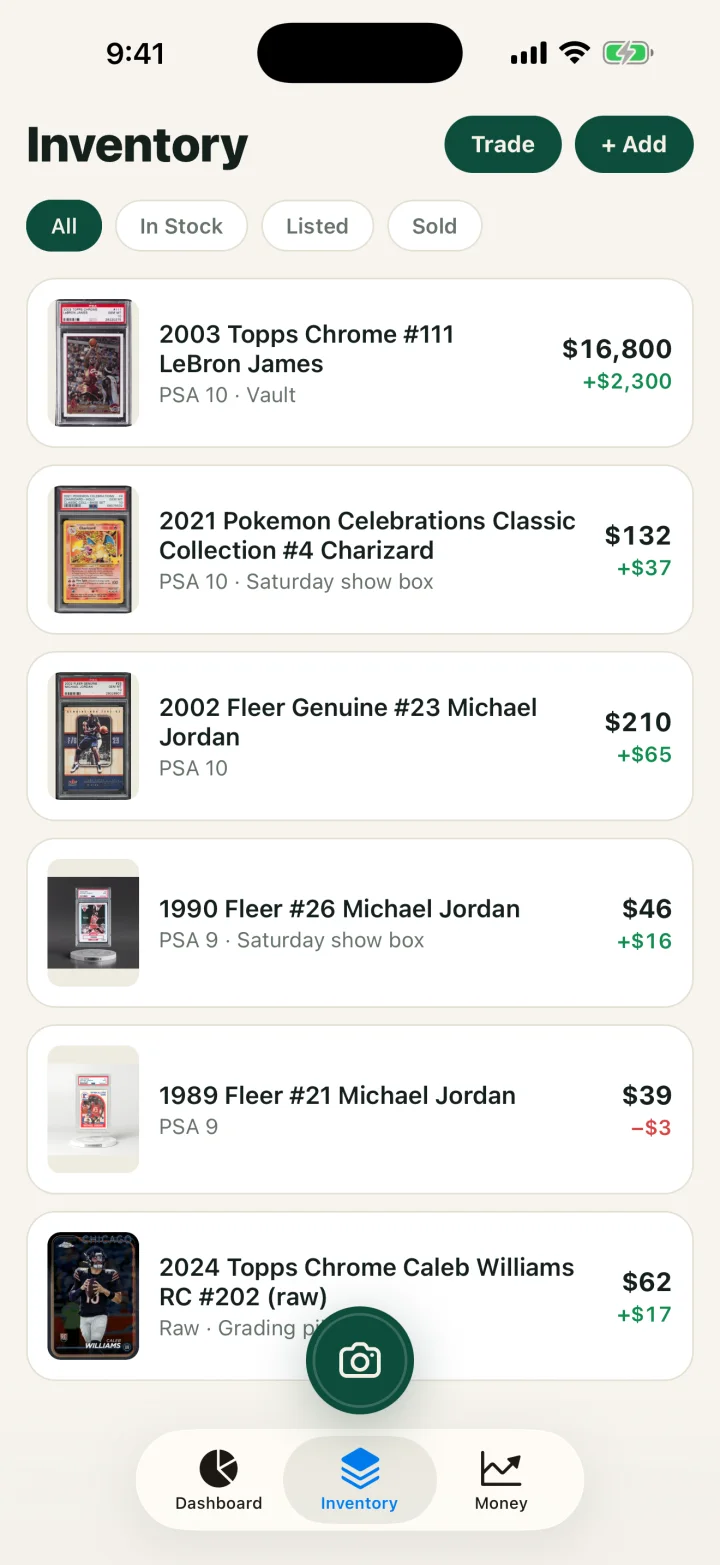
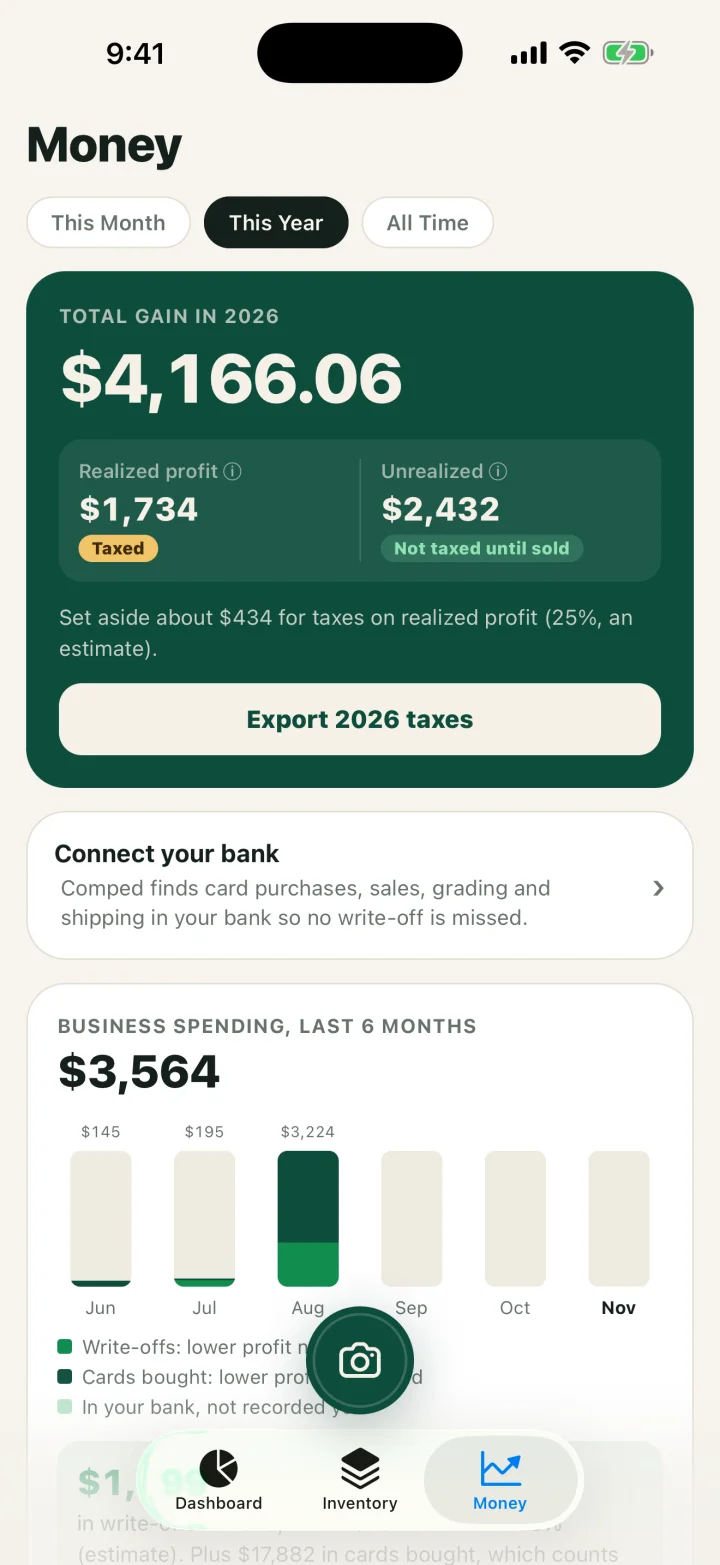
Comped keeps the same record on an iPhone: scanning a card fills in the row, and a sale shows fees, cost basis and true profit without a formula. These are captures of the current app with demo data. Inventory lists each card with its value and gain. A sale is broken down the way columns N to R are. The Money tab is the Summary: realized profit for the year and an export of every sale, card bought and write-off as a CSV.
Related guides
- The Card Vendor's Master Guide to Taxes: dealer, hobby and investor rules in full.
- Cost basis for cards bought with cash or by trade: the basis rule behind each cost column.
- Card show inventory sheet: the printable for one show, to type into this file afterward.
- Card show vendor taxes checklist: the records before, during and after a show.
FAQ
Is this card inventory spreadsheet really free?
Yes. The Excel file and the CSV are free to download, use and share. There is no sign-up and no email required.
Does it work in Google Sheets?
Yes. Open Google Sheets, choose File, Import, Upload and pick the Excel file, then select Replace spreadsheet. The formulas and drop-down lists come across.
What columns does a sports card inventory spreadsheet need?
For a seller: an ID, the card, the grade, the date bought, every cost, the date sold, the channel, the sale price, fees and shipping. Cost and sale columns are what turn a list of cards into profit and a tax record. A collector's checklist can skip the sale side.
Should every card have its own row?
Give a card its own row when you would price and sell it by itself. Bulk, playsets and sealed lots can share one row with one cost. Split a row when you pull a card out to sell alone, and move its share of the cost with it.
How do I split the cost of a lot or binder across cards?
Split the price by each card's share of the lot's total value, or evenly when the cards are alike. The shares must add up to what you paid. There is no IRS ruling specific to cards, so write the method in Notes and use it every time.
Are grading fees part of basis or an expense?
There is no IRS guidance specific to grading fees. For a dealer, the fee is treated here as a direct cost of the card and recovered when the card sells, which is why it has its own basis column.
What if I bought the cards 20 years ago with no receipt?
Enter the original cost if you know it and document how you know it in Notes. If the cost is unknown, write down what you can; the IRS can treat a card with no supported cost as having zero basis.
Is it profit or the whole sale that is taxed?
Profit. A business subtracts the cost of the cards sold and its fees from gross sales. The Profit column and the Schedule C helper show that figure, and you owe tax on it whether or not a 1099-K arrives.
SOURCES
- Publication 334, Tax Guide for Small Business, IRS, checked November 2026.
- About Schedule C (Form 1040), IRS, checked November 2026.
- Schedule C (Form 1040), 2026, IRS, downloaded November 13, 2026.
- Publication 583, Starting a Business and Keeping Records, IRS, checked November 2026.
- Topic no. 420, Bartering income, IRS, checked November 2026.
- Topic no. 409, Capital gains and losses, IRS, checked November 2026.
- Form 1099-K FAQs: General information, IRS, checked November 2026.
- How long should I keep records, IRS, checked November 2026.
This is general information for card sellers, not tax or legal advice for your situation. Rules change and states differ; a CPA who knows your numbers wins every time.