How it works out profit on a card
Profit in Comped is the sale price minus the fees, the shipping and what the card cost you. The screen below is one sale from the app's demo data. Every screen on this page is the current app with demo data, not real sales.
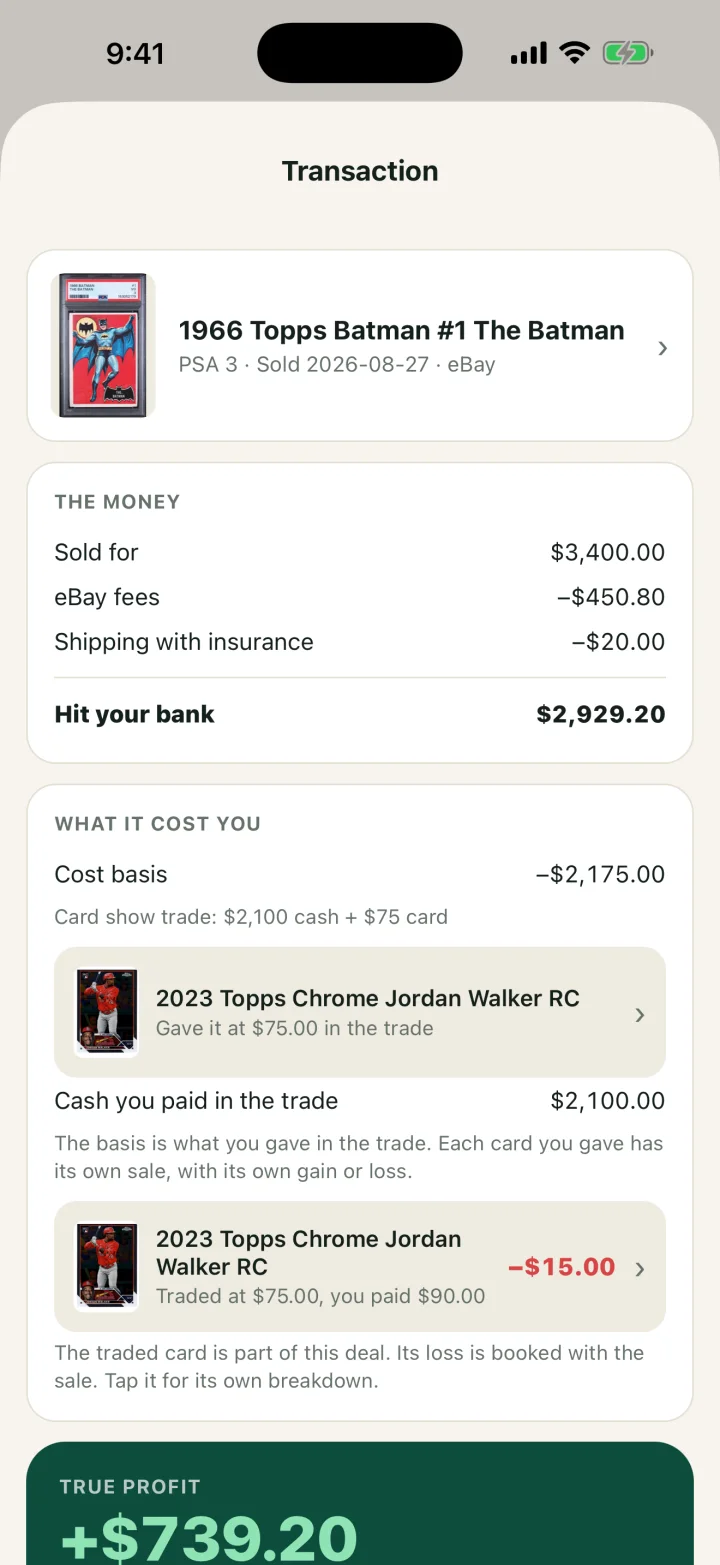
| Line | Where it comes from | On this sale |
|---|---|---|
| Sold for | You enter it when the card sells | $3,400.00 |
| Fees | You enter the amount from the payout report | -$450.80 |
| Shipping | You enter it | -$20.00 |
| Hit your bank | Comped works it out | $2,929.20 |
| Cost basis | Saved when you bought the card: $2,100 cash plus a $75 card | -$2,175.00 |
| Loss on the card you traded away | You paid $90 for it and traded it at $75 | -$15.00 |
| True profit | Comped works it out | $739.20 |
A 1099-K reports gross payments, so on this sale a form would show $3,400. The other lines are yours to supply. The cost basis guide for cash and trade buys explains why the basis here is $2,175.
Scanning and prices
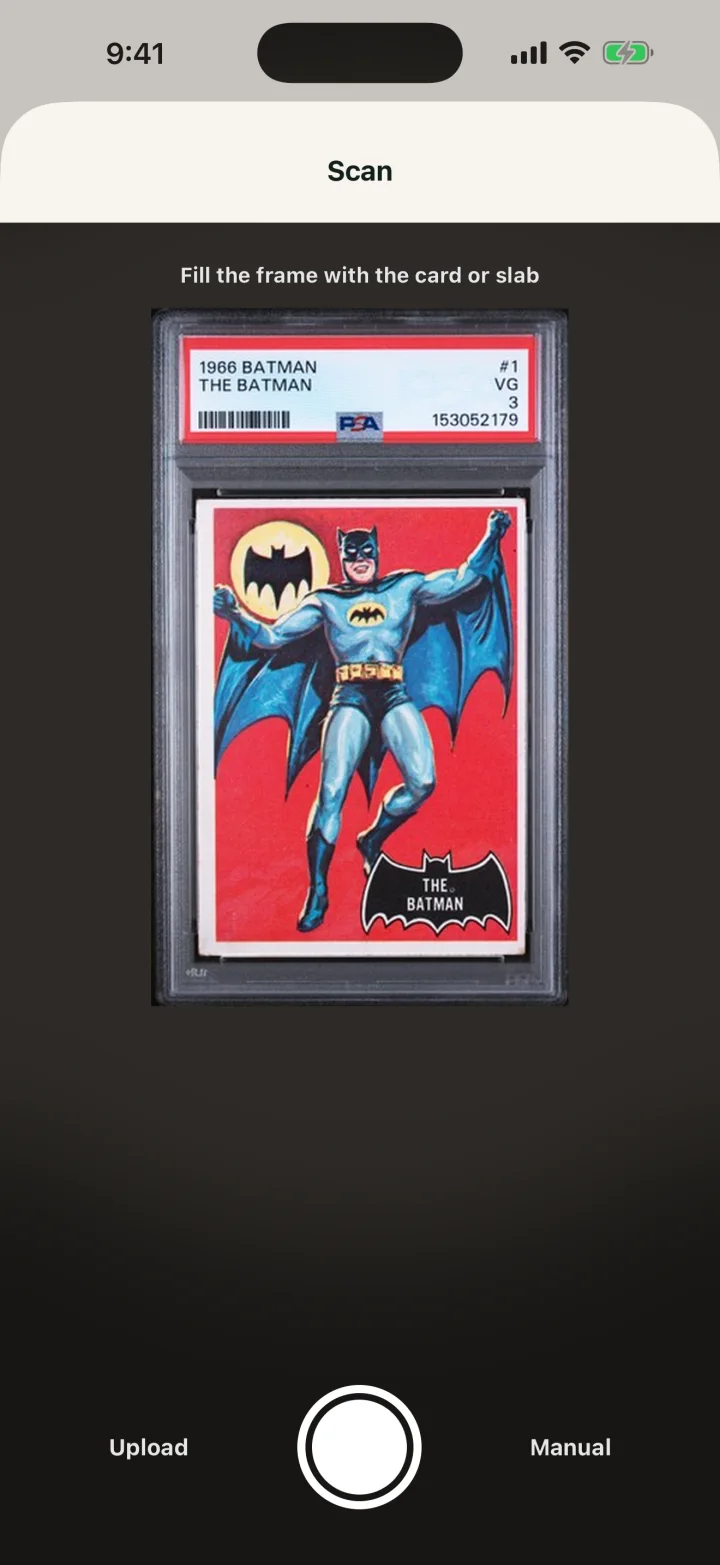
Point the camera at a raw card or a slab and Comped identifies it: player, year, set, card number and parallel. On a slab it also reads the grader, the grade and the cert number. Upload sends a photo from your library, and Manual lets you search by name or type the card in.
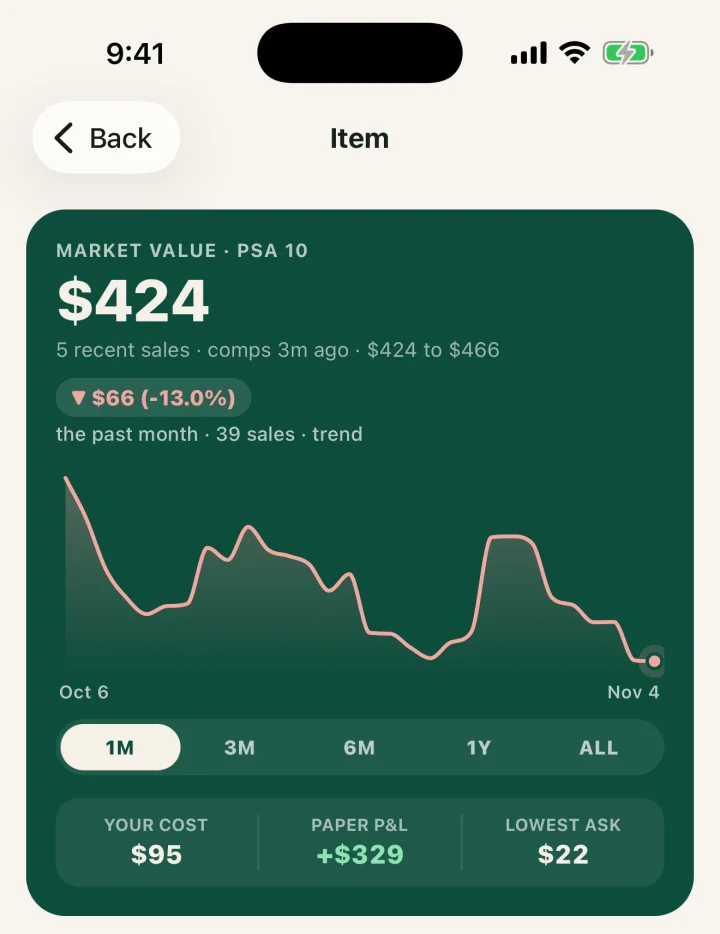
Each card has a page with a market value from recent sales, a price line for the past month up to all time, and current listings with the lowest first. If you own the card, the same page shows your cost and your paper gain.
The free plan scans 5 cards a week and resets every Monday. Searching by name or typing a card in does not use a scan. To check a price without the app, the card price lookup is on this site.
Buys, sales and trades
After a scan, choose buy or sell, enter the price and where the deal happened, and save. A buy puts the card in inventory with its cost, date and your photo. A sale finds the card in inventory, by cert number first, and moves its cost into the profit on that sale.
A trade has its own screen. Pick the cards you give from inventory and set the value agreed for each. Add cash either way, then add the cards you get. Comped shows the cost basis of what you receive and the gain or loss realized on the cards going out.
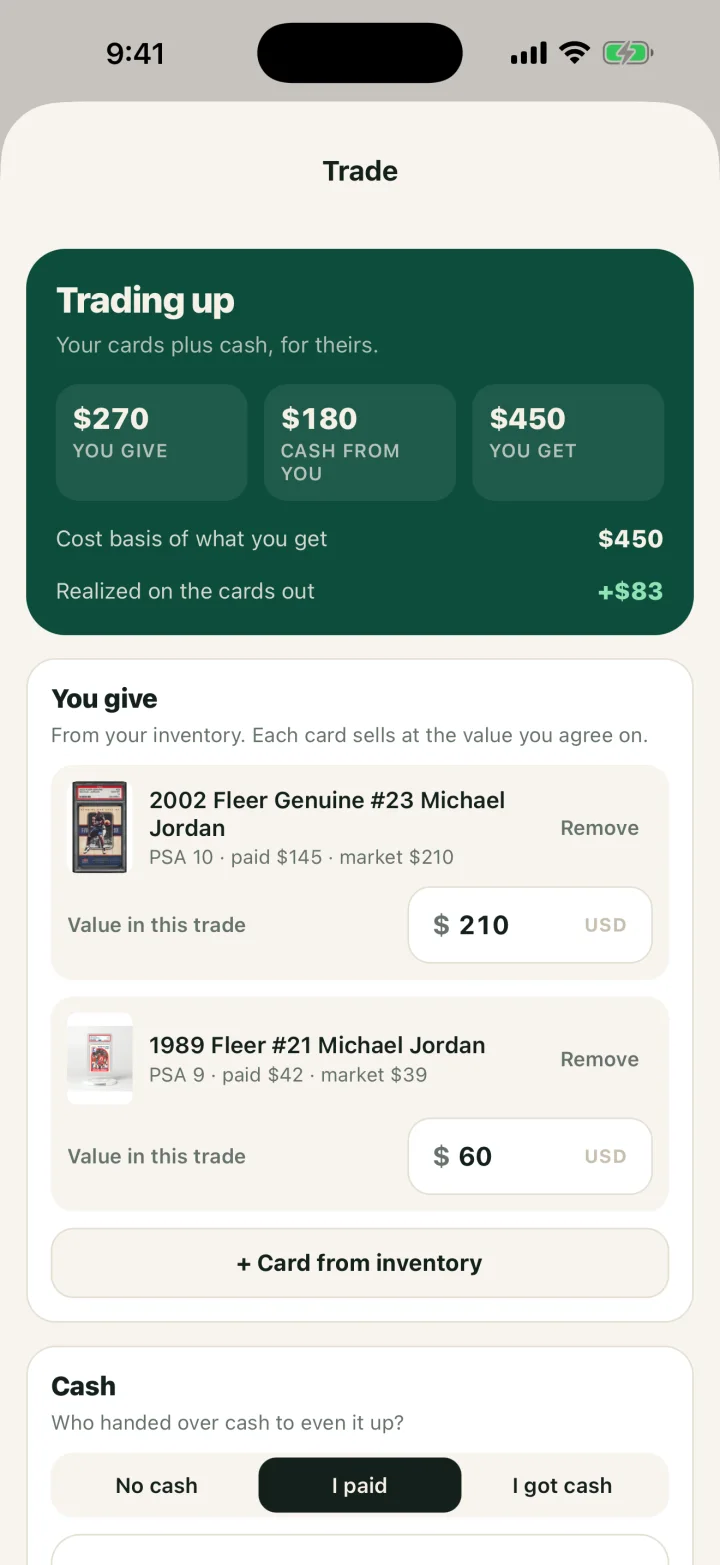
In that example the two cards going out cost $187 and trade at $270, so $83 is realized that day. The IRS treats a trade as barter. To price a trade before you agree to it, use the card trade calculator.
Inventory: cost against value
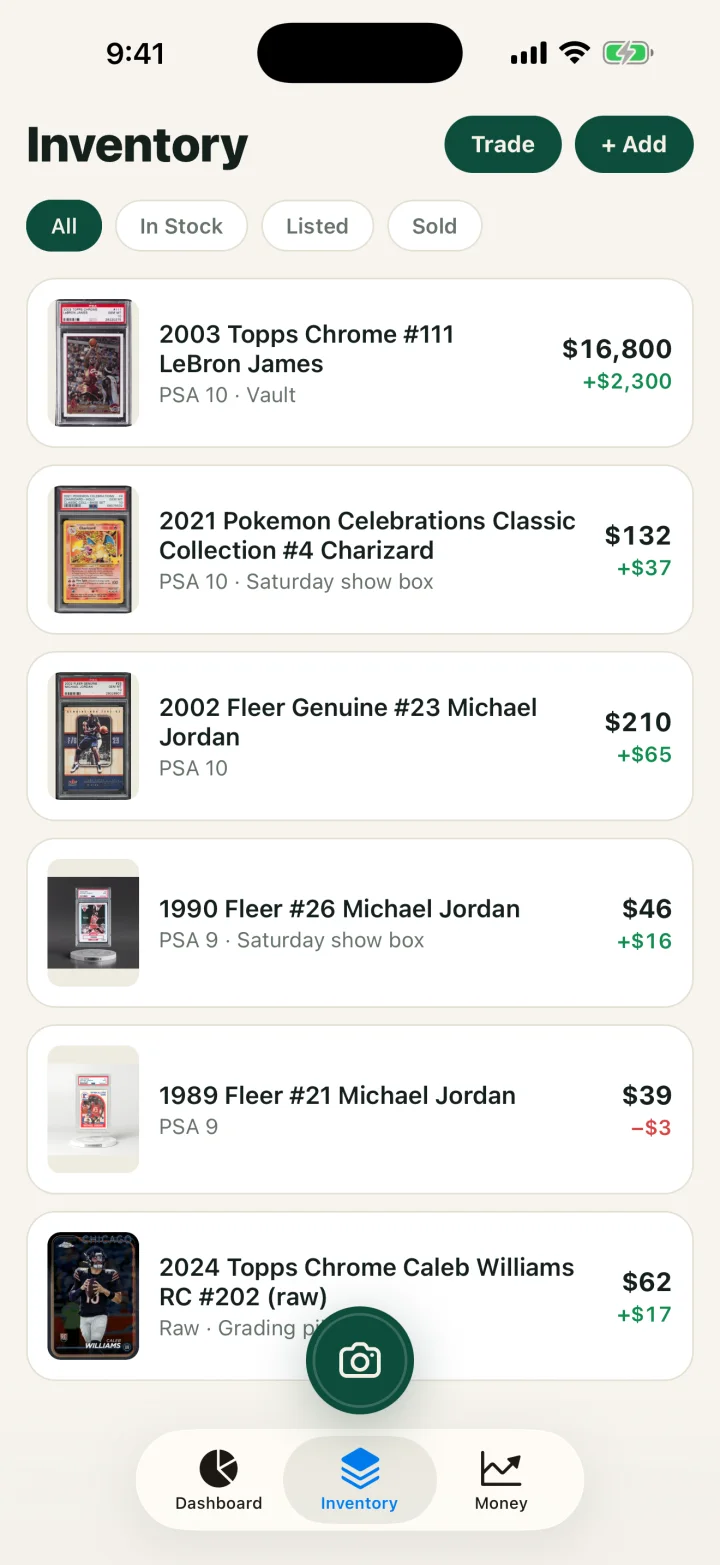
The Inventory tab lists every card with its current value and the gain or loss against what you paid. Filters split it into In Stock, Listed and Sold. An optional show box field records where the card is stored.
Write-offs, the set-aside and the tax export
The Money tab splits the year into realized profit, which is taxed, and unrealized gain, which is not taxed until the card sells. Under it is a set-aside estimate at 25% of realized profit and a button that exports the year.
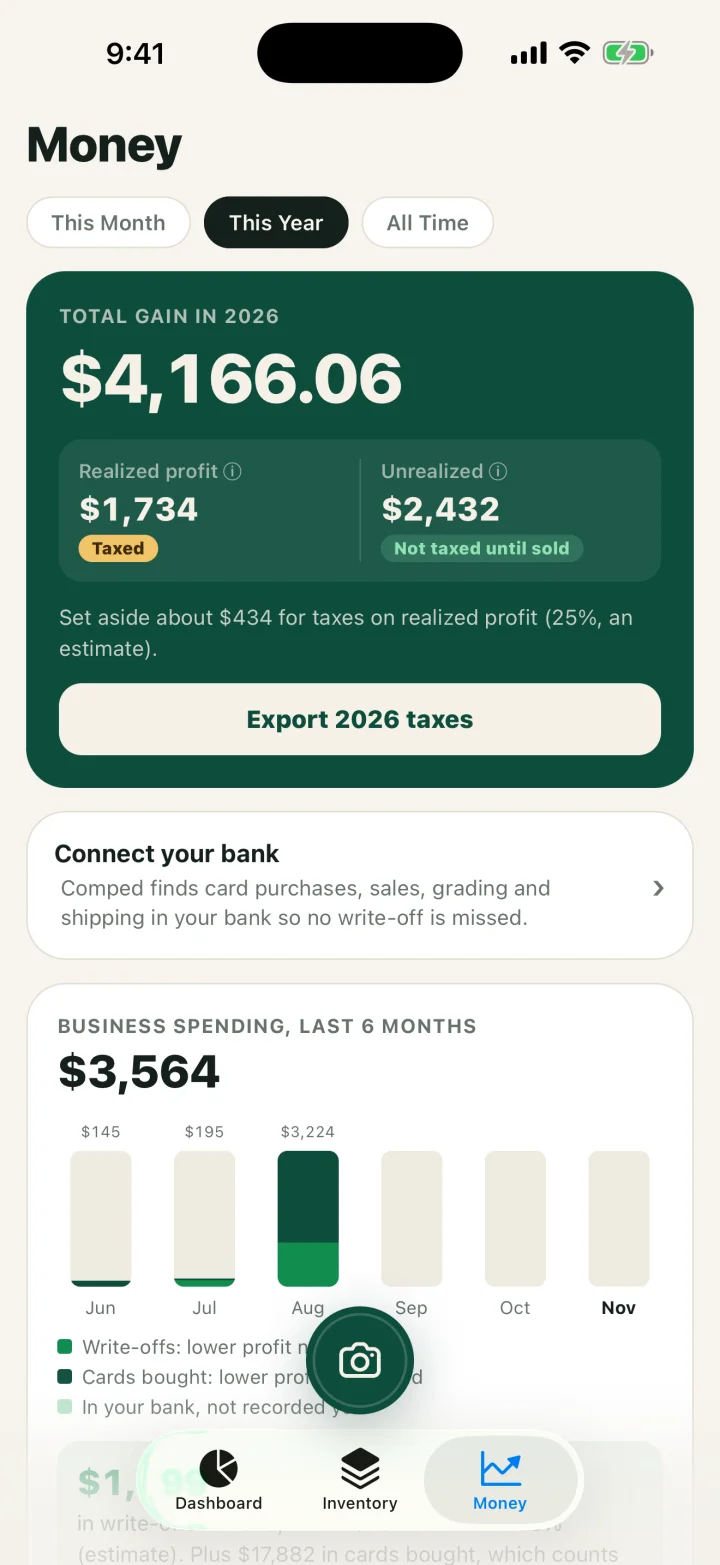
The export is one CSV file for the year. It opens the iPhone share sheet, so you can mail it to a preparer or save it to Files. It has four blocks:
- A summary laid out like Schedule C: gross receipts, cost of goods sold, fees, each write-off category and net profit.
- Every sale: date, card, grade, sale price, fees, cost, profit and where it sold.
- Every card bought: date, card, grade, cert, cost, source and whether it has sold.
- Every write-off: date, category, amount and note.
Write-offs take a category, an amount and a note. The categories are table and show fees, travel and mileage, grading fees, supplies, shipping and postage, subscriptions and tools, and other. A set-aside is a savings habit, not a tax calculation. The card sale tax calculator estimates federal tax on one deal, and the card show vendor tax checklist lists what a preparer asks for.
The bank link
Pro links a bank account through Stripe. Comped flags the transactions that look card related, and you mark each one as a card sale, a refund, a card purchase or a write-off. You can also match it to a record you already made. A merchant name only suggests a match, so read each one before you record it.
Who it suits and what it does not do
Comped suits a seller with an iPhone who buys and sells at shows, on eBay or on Whatnot, and wants profit per card and a year file for taxes. It does not suit a shop that needs a register, or anyone on Android.
- iPhone only. There is no Android app and no web version.
- It does not import sales from eBay or Whatnot. You enter the sale, and you enter the fee amount. The card profit calculator works out a platform's fee if you need the figure.
- It does not file or prepare a tax return.
- It does not compute or file sales tax, and it has no field for sales tax collected.
- It does not take card payments or email receipts to buyers.
- Mileage is entered as a dollar amount with a note. The app does not multiply miles by a rate.
- No team accounts. One person, one sign-in.
Plans and price
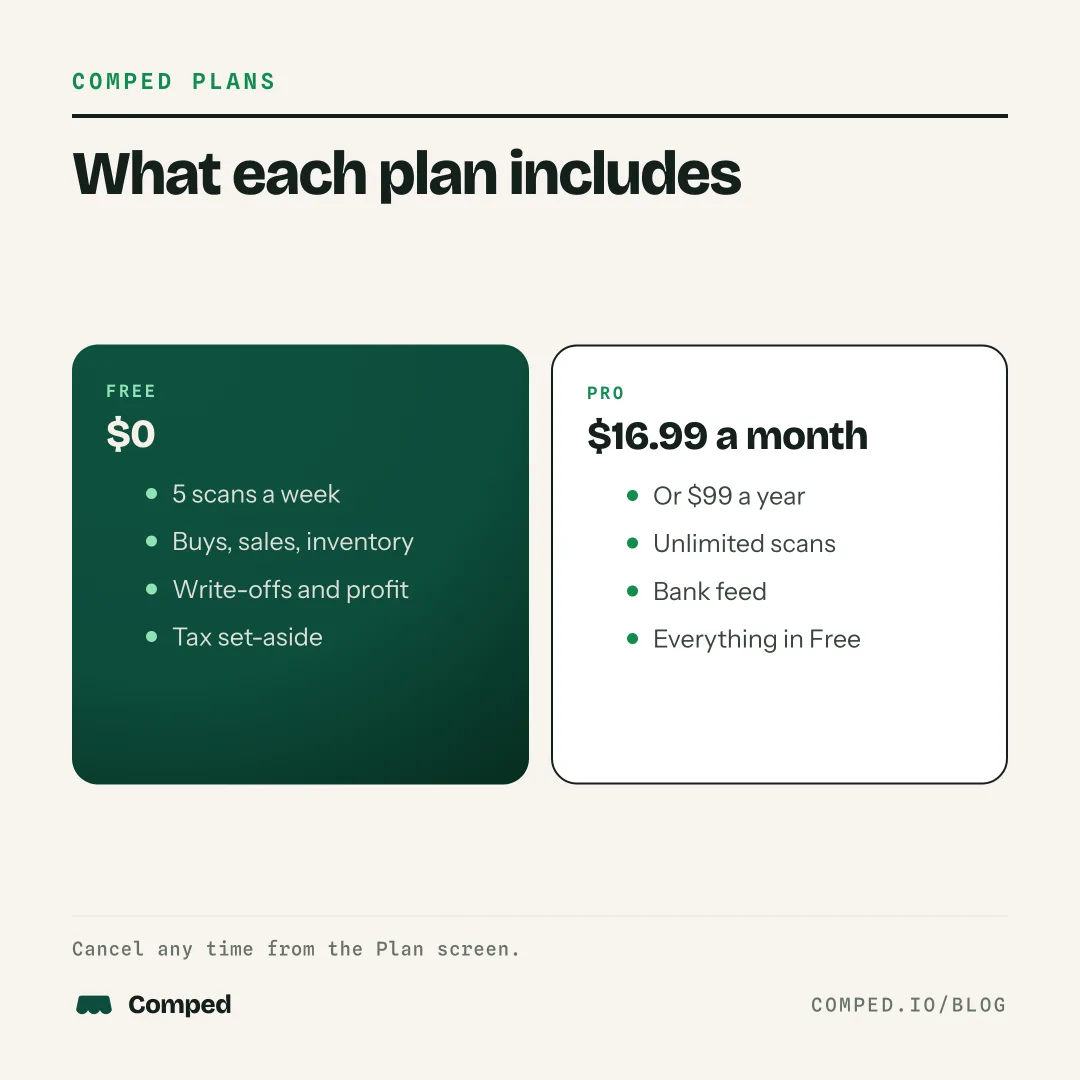
Comped is free to download, and the free plan keeps every record. Pro adds unlimited scans and the bank link.
| Plan | Price | Includes |
|---|---|---|
| Free | $0 | 5 scans a week, cards typed in by hand, buys, sales, trades, inventory, write-offs, the Money tab and the tax export |
| Pro, monthly | $16.99 a month | Everything in Free, unlimited scans, the bank link |
| Pro, yearly | $99 a year | The same as monthly, billed once a year |
Checkout opens on comped.io and is handled by Stripe, with receipts by email. You can change plans or cancel from the Plan screen in the app. Sign in with Apple, or with your email and a 6 digit code; there is no password.
Related guides
- Card show vendor apps compared: price, platforms and features of eight apps, from their own pages.
- Free card inventory and profit spreadsheet: the same records in Excel or Google Sheets.
- The card vendor's master guide to taxes: cost basis, inventory and the forms.
FAQ
Is there an app that tracks profit on sports cards, not just value?
Yes. Comped saves what you paid for each card and subtracts it when the card sells, along with the fees and shipping you enter. The Money tab keeps realized profit apart from the paper gain on cards you still hold.
Is Comped free?
Yes. The free plan includes 5 scans a week and every record: buys, sales, trades, inventory, write-offs and the tax export. Pro costs $16.99 a month or $99 a year and adds unlimited scans and the bank link.
Does it take off eBay fees automatically?
No. You enter the fee amount from your payout report when you record the sale. Comped then subtracts it and shows what hit the bank and the true profit.
Can I track trades?
Yes. The Trade screen takes the cards you give, cash either way and the cards you get. It shows the cost basis of what you receive and the gain or loss on the cards going out.
Can I export my sales for taxes?
Yes. Export taxes on the Money tab makes a CSV for the year with a Schedule C style summary, then every sale, every card bought and every write-off. Comped does not file the return.
Does it work for Pokemon cards?
Yes. Comped records Pokemon cards, raw or graded, the same way as sports cards: the card, grade, cert, cost and sale.
Can I add a card without scanning it?
Yes. Search for the card by name or type it in by hand. Neither uses one of the free plan's 5 weekly scans.
Does it work on Android or in a browser?
No. Comped is an iPhone app. The free inventory and profit spreadsheet on comped.io works on any computer.
SOURCES AND SCOPE
Features described from the Comped iPhone app, version 1.2.2, November 13, 2026. Screens show demo data. Prices are in US dollars. The 1099-K rule is from the IRS Form 1099-K FAQs and the barter rule from IRS Tax Topic 420, checked November 2026. Read our sources and editorial standards.
This is general information for card sellers, not tax or legal advice for your situation. Rules change and states differ; a CPA who knows your numbers wins every time.